
A few days ago we shipped an MCP server, automatic pipelines, and a rebuilt WordPress integration. This release goes further. It changes what Publisher is. Until now Publisher was a place to write and schedule content. After this release it works as a data-driven content engine: it tracks how your content actually performs, uses those results to guide what the AI drafts and when it schedules, and exposes the whole platform through an API.
There are eight large changes here. They are easier to understand as a loop than as a list. Analytics captures what works. The AI applies those lessons to your timing and your drafts. The new composer and calendar make it fast to refine and oversee. The API wires it all into your other tools. Here is what changed and why it matters.
Analytics that cover your whole presence, not just Publisher
Publisher now tracks real performance data across three tiers, for content you publish through Publisher and for content already living on your connected accounts.
Post performance covers likes, comments, shares, impressions or views, and clicks per post. These sync on a decaying schedule – hourly for the first day, daily through 30 days, then stopped to conserve API quota – with historical snapshots so you can see how a post grew over time. Account-level metrics track followers, following, and post counts per connected account, synced daily, so you can watch audience growth even before you publish anything new. For WordPress sites, blog traffic brings in page views, unique visitors, and a traffic-source breakdown via Google Analytics or Plausible, including how much of your blog traffic comes from social referrals.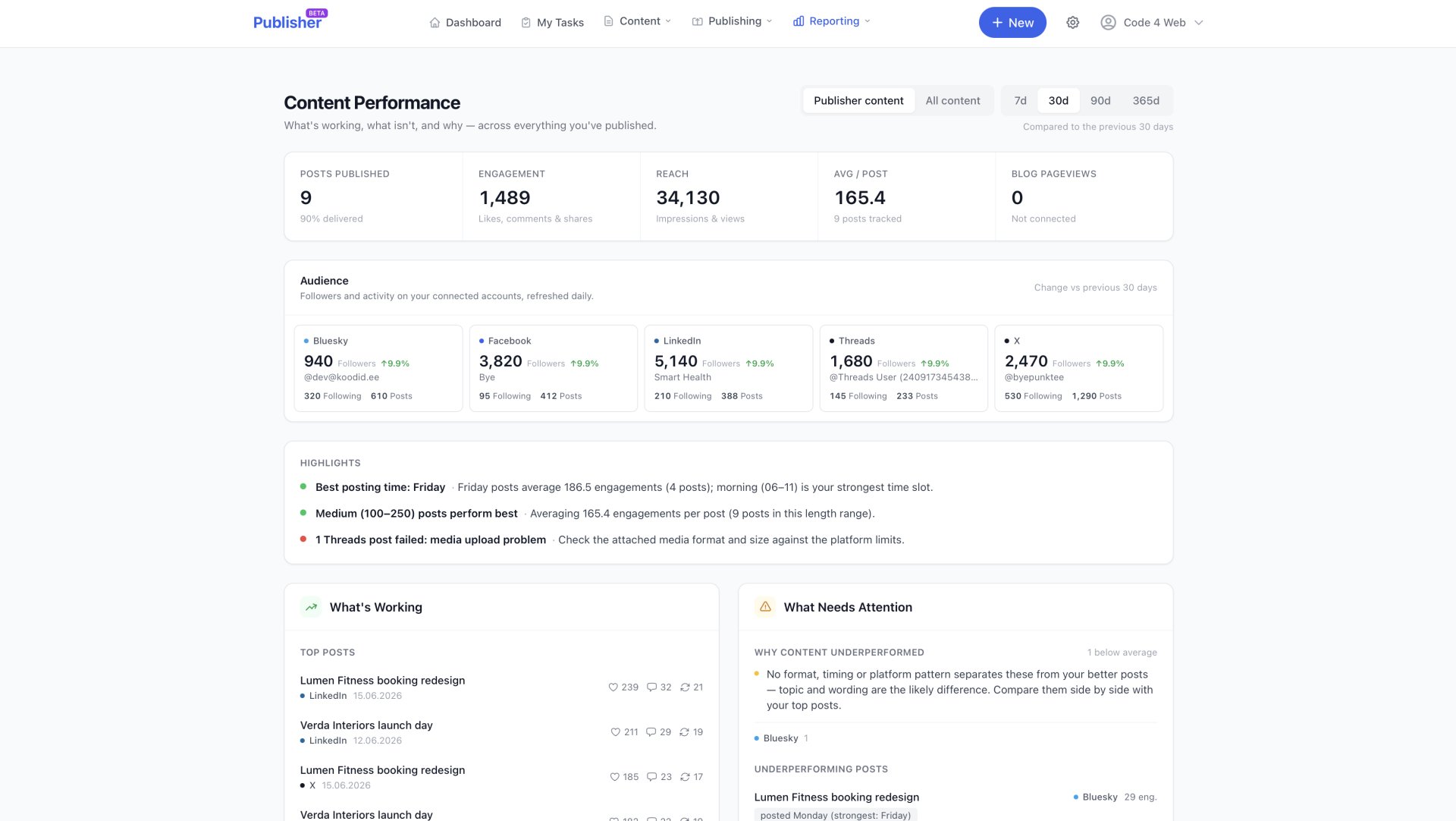 Publisher can also import the posts already on your connected accounts and your existing blog posts. These are kept separate from Publisher-managed records in their own store. On the first run it backfills up to two years of history, then syncs incrementally, so your analytics reflect your whole presence rather than only what you have published through the app.
All of it comes together on the Performance dashboard: a KPI strip with period-over-period deltas, audience growth per account, platform breakdowns and engagement rates, timing analysis, content-format patterns, top posts, and underperformance analysis that explains why a post lagged against your own winning patterns. You can toggle between Publisher content and all content, across 7, 30, 90, and 365-day periods. The insights are built only from synced metrics and real publishing records, with sample-size guards so a handful of posts does not produce confident-sounding nonsense.
The AI now reasons from your numbers, not generic assumptions
The performance data does not just sit on a dashboard. It feeds directly into the AI features, so your proven patterns get applied automatically.
When you plan a schedule, the AI can propose recurring timeslots based on your last 90 days of engagement data, broken down by platform, weekday, and time-of-day block. It leans toward the days and times that historically performed best while balancing every platform a timeslot publishes to, and it explains the reasoning behind each proposed slot. With no data yet, it falls back to general best practice.
The article-writing agent consults your performance insights before it writes – your best channels, strongest timing, winning formats and lengths, and your actual top posts from the past year – and shapes the draft’s angle, structure, and length to match what has worked. Social post generation gets the same treatment, favouring the angle, length, and format of past winners on similar topics. When drafting for a specific platform, the insights narrow to that channel’s own track record.
The point is consistency. Nobody has to remember that media posts outperform text-only ones, or which channel is strongest. The AI carries that knowledge into every draft and every schedule.
The whole drafting process is now agentic
Article drafting is no longer a fixed sequence of steps. It is run start to finish by an autonomous AI agent. You give it your source material – notes, links, uploaded files – and it works the way a writer would. It studies everything you provided, decides when it needs to search the web and read full pages for current facts, reviews your tone of voice, pulls in your company knowledge base and your past performance patterns, and then writes the complete draft. It decides what each piece needs and does only that, rather than running the same rigid recipe every time.
The agent is tool-using and multi-step. It reasons in a loop and calls tools only when the topic calls for it: web search, full-page fetch, tone lookup, performance insights, knowledge retrieval, and finally writing and revising the draft. It runs in the background with a live progress view, so you can close the tab and come back to a finished draft. Non-English drafts get a specialist pass so the final copy reads natively.
Once a draft lands in the editor, the agent chat continues the same session. It remembers the research it did and the choices it made. Ask it to tighten the intro or make a paragraph more concrete, and it applies targeted, highlighted edits directly in the editor that you can accept or undo, instead of regenerating the whole article. You can also just ask it questions.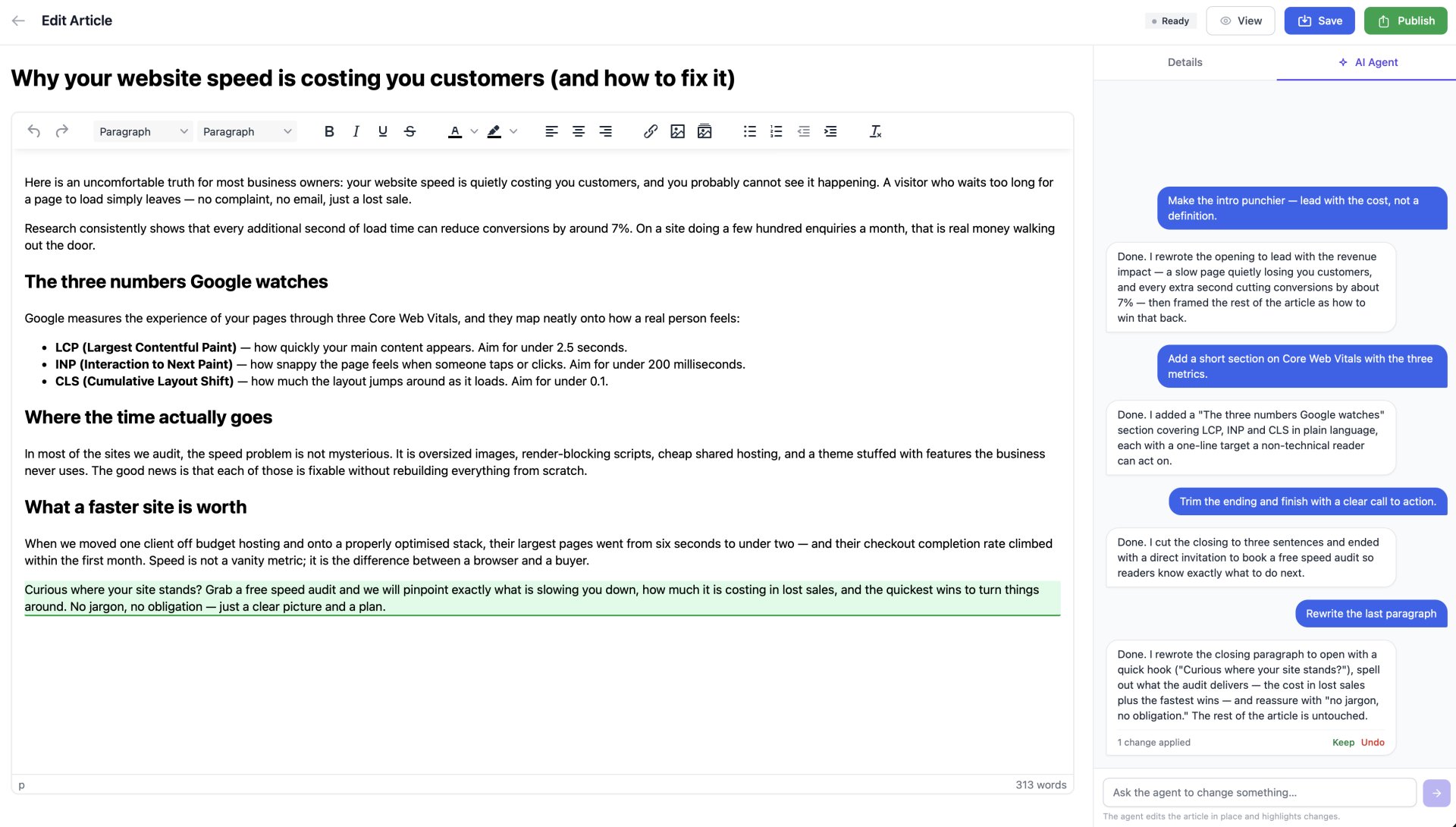
Why this matters is simple. A fixed pipeline can only do the steps it was built to do, in the same order, whether the topic needs them or not. An agent adapts to the work in front of it: it researches when the facts are not already on hand, applies what has worked for you, and keeps a memory of its decisions so editing is a conversation rather than a restart. You get a stronger first draft and a faster path to a finished one.
A knowledge base that keeps the AI grounded in your real facts
Each organisation can build a company knowledge base – your services, products, positioning, story, terminology, and voice – that the AI draws on whenever it writes. You can enter this directly or point Publisher at your website, which it scrapes and keeps refreshed so the knowledge stays current without manual upkeep.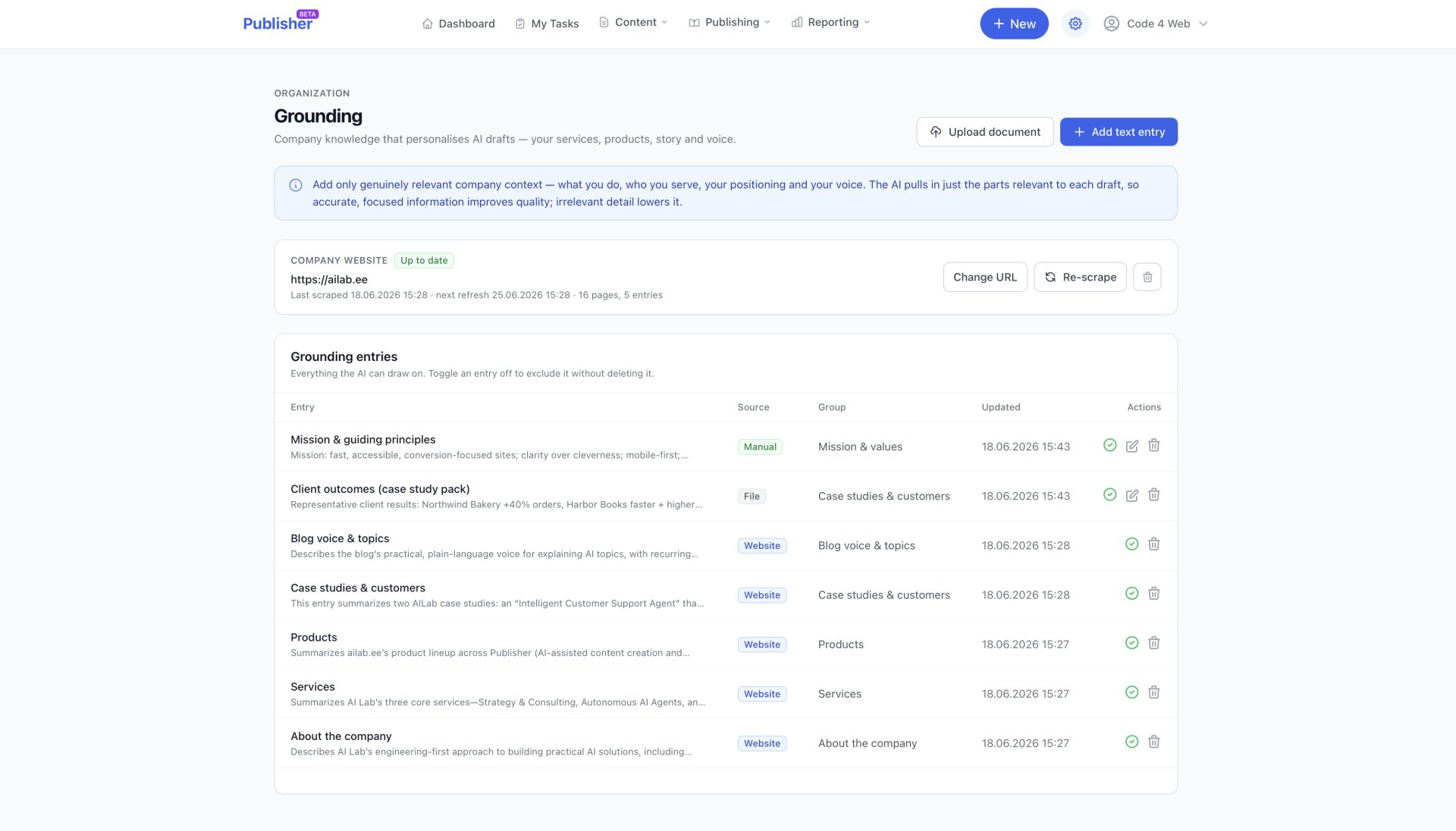
When the AI drafts an article, social post, or media plan, a relevance step selects only the slice of your knowledge base that fits the topic and feeds it into the generation. The copy then makes specific, accurate claims about your business and uses your own terminology, instead of generic filler. Generic output is the giveaway that no one really wrote a piece. Grounding every draft in your curated facts is what makes the content sound like it came from inside your company.
A simpler composer and a calendar that shows more at a glance
The post composer now has two clear modes. Write one shared message for all platforms, or switch to per-platform customisation when a post needs tailoring – Twitter’s character limits against LinkedIn’s longer form, for example. In per-platform mode, the global content box steps aside so you only see the relevant fields. Composing includes live per-platform character-limit enforcement and a real-time preview split into platform tabs, so you see how each post will render before scheduling.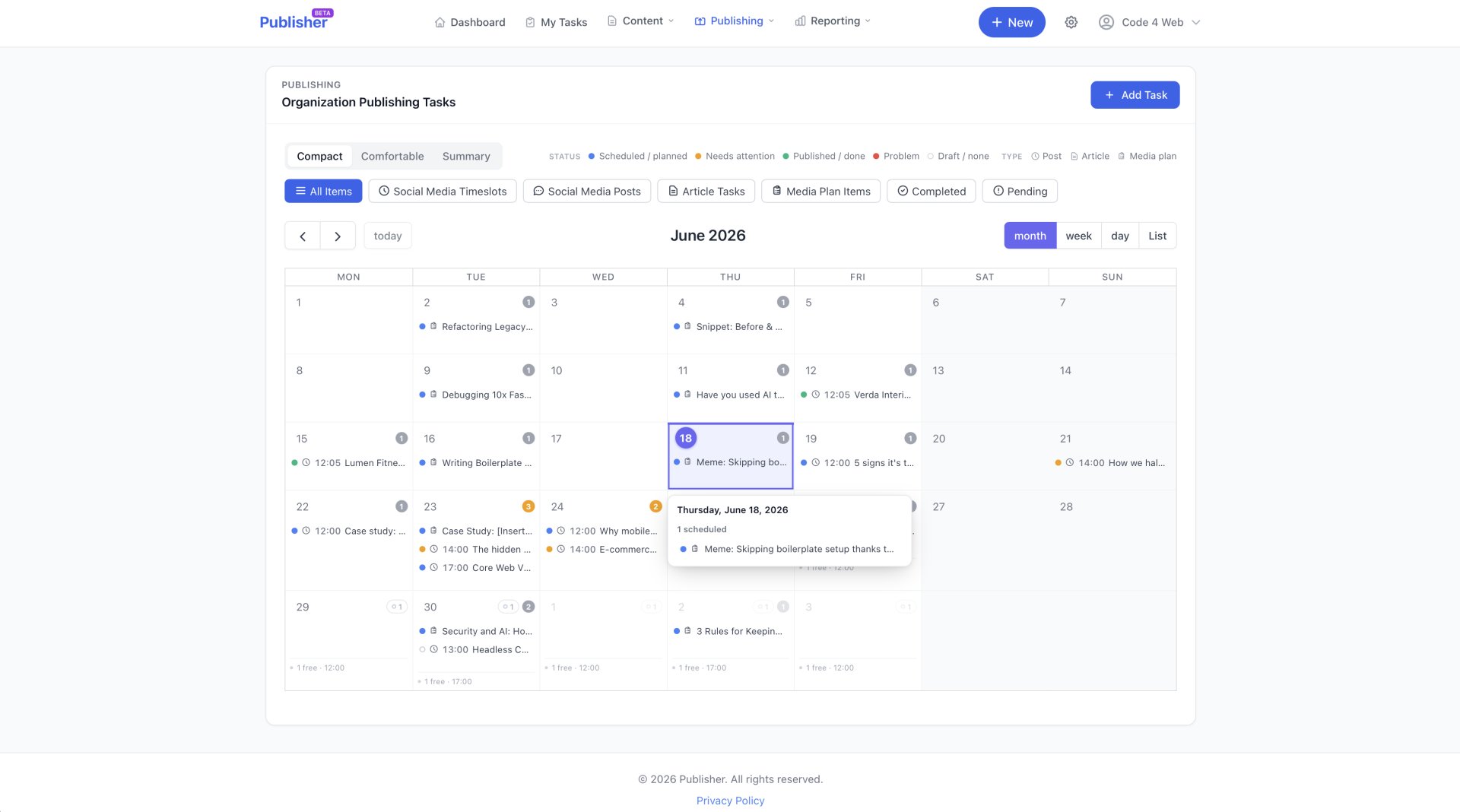
The publishing calendar has been rebuilt around a capacity model and a status-first visual language. The month view fits far more content without overflow or truncated text. Colour means status, not type: a status dot (green for done, amber for needs attention, red for a problem, blue for scheduled, a hollow ring for no status) sits next to a monochrome glyph, the time, and the title. Each day summarises its own availability in the footer – “4 open slots”, “3 posts scheduled” – with an at-a-glance wash when a day needs attention. Click a day for a quick view of its free slots and scheduled items without leaving the month. A density toggle (Compact, Comfortable, Summary) matches how you like to work, and local edits made after publication are flagged so editors can push them back to the live WordPress site.
Everything in the UI is now scriptable through a REST API
Everything you can do in the Publisher UI is now available through a versioned, organisation-scoped REST API, built for automation, headless workflows, and third-party integrations.
Authentication uses API keys created in Settings under API Access, by admins with the Manage API keys permission. Each key acts as a specific team member and is bound to one organisation. Its effective access is the intersection of the key’s scopes and that member’s permissions, so UI capability and API capability stay in lockstep. Coverage spans articles (including AI drafting, chat, rewrite, and deep research), publishing and WordPress sync, social posts and approval workflows, schedules and AI timeslot proposals, media and media plans, the knowledge base, team and roles, settings, analytics, and platform connections.
The conventions are standard, with status polling for long-running jobs and a per-key rate limit. The contract is treated as frozen – only additive changes are made within it, so integrations built today keep working. Agencies and teams can feed Publisher from their own tools, build custom dashboards, and automate publishing end to end without being locked into the UI.
One visual language across the whole app
The app now runs on a shared design system with a calm, functional visual language. Colour signals status only – green, amber, red, blue for state, never decoration. Platform colours appear as a small brand dot for recognition, never to imply status. Primary content reads above secondary, technical detail is quietened or collapsed, and screens use bordered cards with subtle shadow, hairline dividers, and generous spacing instead of heavy drop shadows. A kit of reusable components keeps every screen consistent and easy to extend, which matters when a release adds this many features at once. They all speak the same visual vocabulary.
How the pieces fit together
Read individually, these are eight features. Together they close a loop. Analytics captures what works. The analytics-driven AI and the drafting agent apply those lessons, grounded in your knowledge base, to your timing and your drafts. The composer and calendar make it fast to refine and oversee. The API wires it into the rest of your stack. The design system keeps the whole thing legible.
For a team, that adds up to content operations that improve as your analytics build up, with less manual effort and clearer oversight at every step. To be clear, this is your own performance data guiding your own drafts and timing – not your content training an AI model. Try it, and tell us what you ship.
Share this article